Anova Oven
- 3.2
- Rating
- 10.00K
- Installs
- Free
- Price

 Analysis by App-foxy
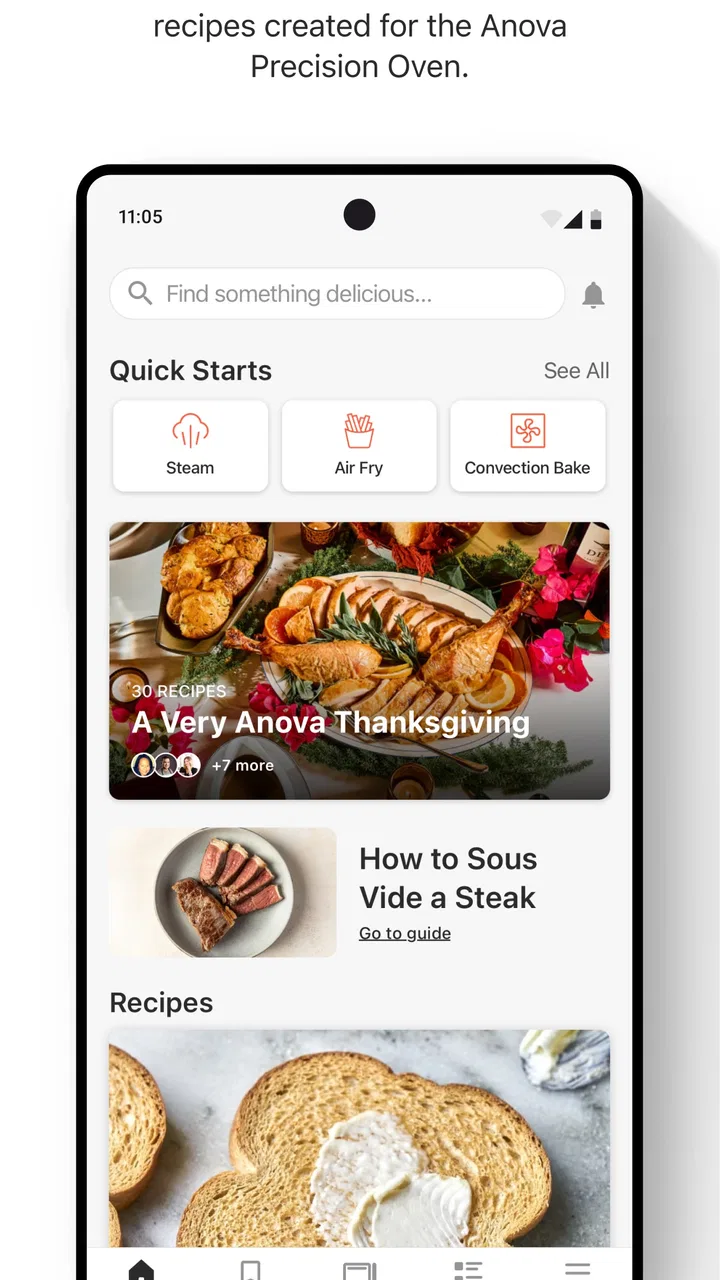
I found Anova Oven most useful when I treated it as the control point for a specific piece of kitchen equipment rather than as a general recipe app. It is a Food & Drink app made by Anova Applied Electronics, LLC, and its purpose is closely tied to the Anova Precision® Oven. That narrow focus is important: if you own the oven, the app can make a complicated cooking appliance feel more approachable; if you do not, there is little reason to keep it installed.
My overall impression is mixed but practical. The app is free to download, has an Everyone age rating, and is currently listed as version 1.2.11 for devices running Android 8.1 or later. I like the idea of having oven-focused guidance and controls in one place, but the experience depends heavily on how smoothly the app, your phone, and the oven work together. It is not the kind of cooking app I would recommend simply because someone wants recipes or a meal planner.
What Anova Oven is really useful for
The best way to understand this app is to imagine standing in front of the Precision Oven with a meal that needs more than ordinary dry heat. The oven is designed around controlled cooking, and the companion app gives that process a more readable interface than trying to manage every setting directly from the appliance. I found that especially helpful when a recipe involves several stages or when I want to repeat a result rather than improvise each time.
You May Also Like

 AccuWeather: Weather Radar
AccuWeather Review: A Quick, Clear Forecast for Everyday Decisions
For everyday plans, the best forecast is the one you can understand quickly. AccuWeather makes rain timing, radar, and local conditions easy to act on, with a few trade-offs.

 Hill Climb Racing
Why Hill Climb Racing Still Turns Crashes Into One More Run
A tiny car, a bumpy hill and one more upgrade: Hill Climb Racing keeps resurfacing because its simple chaos makes every near-miss feel personal.

 AliExpress - Shopping App
AliExpress Makes Global Shopping Feel Personal, but Shoppers Bear the Risk
AliExpress turns a global marketplace into a pocket-sized discovery engine. Its reach is useful, its shopping loop compelling, and its trade-offs easy to miss.

 Lords Mobile: Kingdom Wars
Lords Mobile Is a Kingdom-Building Routine, Not a Quick Match
A case-by-case verdict on the building, battles, device demands, and social commitments that make Lords Mobile rewarding for some players and exhausting for others.

 PDF Scanner app - TapScanner
TapScanner Makes Paperwork Easier to Capture, Check, and Share
TapScanner makes scanning with a phone feel less like a rescue operation and more like a dependable step in getting work done. Its capture tools are useful, though not flawless.

 Block Blast!
 Shows How Much a Puzzle Game Can Leave Out
A quiet grid game shows why puzzle players increasingly value instant clarity, repeatable skill and low-pressure play—and where the genre still needs to catch up.
More From Our News Desk
View All News


That distinction separates it from the usual recipe apps. A standard cooking app can suggest meals, organize ingredients, or provide timers, but it generally stops at instructions. Anova Oven is closer to a bridge between instructions and execution. Its value appears when the cooking method depends on the oven’s capabilities and the user wants a guided workflow instead of a page of text beside the counter.
I would not install it expecting a broad collection of independent recipes that can be followed with any appliance. The app makes the most sense for people who have already chosen the Anova Precision® Oven and want to get more from it. In that situation, the app can reduce the mental load of remembering which mode, temperature, timing, or sequence belongs to a particular preparation.
The trust question starts with the app’s narrow purpose
A focused companion app is easier for me to understand than an all-purpose platform that tries to handle shopping, social sharing, subscriptions, recipes, appliances, and unrelated content at once. Here, the central relationship is clear: the app exists to support the oven. That clarity helps me judge whether I actually need it and whether the account or device connection is worth the effort.
Still, a companion app becomes part of the cooking routine, so reliability matters more than a polished first impression. If I am preparing dinner after work, I do not want to spend several minutes navigating menus, recovering a connection, or wondering whether a command reached the appliance. For a tool like this, trust is not only about privacy. It also means knowing what the app is doing, seeing the important choices before starting a cook, and being able to take over manually when needed.
The app has an average rating of 3.2 from over eight hundred ratings, with more than three hundred written reviews. I read that figure as a reason to set expectations carefully rather than as an automatic rejection. A companion app can be extremely useful to owners while still frustrating people who encounter setup, connection, or workflow problems. The rating suggests that the ownership experience may not be equally smooth for everyone.
Controls I would check before relying on it
Before using the app for an important meal, I would spend time learning the visible controls and confirming how the oven responds. I prefer to test a simple cooking task first, watch the appliance directly, and only then trust a longer or more involved process. This is a sensible habit with any connected kitchen product, but it matters particularly here because the app is tied to an appliance rather than being a passive reference tool.
I would also look closely at the account flow. The practical questions are straightforward: what information is requested during setup, which screens explain the connection, and whether the app lets me review or change account-related choices later. I would not assume that a free download means the entire experience is free. The listing identifies in-app purchases ranging from $1.99 to $9.99 per item, so I would pay attention to any purchase prompt and make sure I understand what I am being offered before confirming it.
That is one of the app’s less obvious trade-offs. The initial price is free, which lowers the barrier to trying it, but the presence of optional paid items means I would not treat every screen as part of a completely cost-free tool. For me, the right approach is to install it because I own the oven, explore the basic workflow, and make a deliberate decision about any extra purchase rather than clicking through automatically.
On a shared household device, I would be especially careful. A phone may be used by several people, and a connected oven can affect dinner for everyone in the home. I would want each person who uses the app to understand which account is active, whether a cooking session is already in progress, and whether a change will alter the current oven settings. This is not a criticism of a particular screen; it is a practical rule for avoiding surprises when control is shared.
Where data-sensitive moments appear in daily use
The most sensitive moments are likely to happen during setup, sign-in, device connection, and purchases. Those are the places where I would slow down and read the choices instead of treating them as routine buttons. If the app asks for permission or presents a communication preference, I would decide based on whether that option is useful to me, not simply accept everything to reach the main screen faster.
I also separate cooking functionality from convenience. A notification that tells me a cooking stage needs attention may be useful, while unrelated promotional messages may not be. If the app presents notification choices, I would keep the ones that help me manage the oven and turn off the ones that add noise. That keeps the companion relationship practical and makes it easier to notice an important cooking update.
Purchases deserve the same attention. The listed range of $1.99 to $9.99 per item is small compared with many subscription services, but small charges can still accumulate when they are made casually. I would check whether a paid item is a one-time addition or part of a broader feature path, then confirm the purchase through the platform’s normal controls. I would also avoid letting a guest or child use the app unsupervised if purchasing is available.
Another data-sensitive moment is simply leaving the app connected over time. I prefer to review which account is signed in, remove access from a phone I no longer use, and avoid keeping an old device connected just because it was convenient during setup. Those are user-side habits rather than claims about the app’s data practices, but they give me more control over a connected appliance.
How much control the user keeps
The app works best for me when it supports a decision rather than hiding one. Before starting a cook, I would want to see the important settings clearly enough to check them against the food I am preparing. A guided process is helpful, but guidance should not replace judgment. Thickness, quantity, cookware, starting temperature, and personal preference can all change the result, so I would still inspect the food and use normal kitchen safety practices.
This is also why I would not rely on the app as an unattended substitute for cooking awareness. Even when a connected appliance follows a programmed process, I would remain available to check the meal, especially during my first attempt at a recipe. The app can organize the process, but it cannot know every detail of the ingredients on my counter or whether my preferred level of doneness matches a preset instruction.
A realistic everyday scenario would be a Sunday meal prepared in stages. I might use the app to begin with a controlled preparation, leave the oven working while I prepare vegetables, and return to check the next step rather than repeatedly adjusting the appliance by hand. The benefit is not that the app magically cooks dinner; it is that the process becomes easier to follow. I can keep the sequence in view, reduce the chance of forgetting a transition, and repeat the same approach the next weekend.
For a busy weeknight, the trade-off is different. If I already know the oven settings and need only a quick timer, the app may feel like an unnecessary layer. A simple kitchen timer or the appliance’s own controls could be faster. I would reach for Anova Oven when the connected guidance adds value, not automatically for every meal.
Three practical habits that improve the experience
I would test the connection with a low-stakes dish before using the app for an expensive ingredient or a meal with guests. This reveals whether the phone and oven communicate reliably in my kitchen and gives me time to understand the controls without pressure.
I would save a short personal note after a successful cook: the food quantity, the result I liked, and any adjustment I made. The app can help manage the appliance, but my own observations are what make repeated cooking more consistent when ingredients or portions change.
I would review notifications and purchase prompts during setup rather than during dinner preparation. Making those choices calmly prevents a useful cooking alert from being buried in unwanted messages and reduces accidental spending.
A fourth habit is to keep a fallback plan. If my phone is unavailable, the connection is interrupted, or another household member needs the appliance, I would make sure I understand how to continue with the oven itself. This is a meaningful trade-off with any companion app: convenience increases when the digital layer works, but dependence increases too. I prefer connected control as an option, not as the only way I know how to cook.
Who should use it and who should skip it
I think Anova Oven is a good fit for an owner of the Anova Precision® Oven who wants structured help with the appliance’s cooking process. It should appeal to people who enjoy experimenting but want a repeatable method, as well as cooks who find multi-stage preparation difficult to manage from printed instructions alone. The app is also more attractive for households where several people share cooking duties and a common digital workflow is easier than passing around handwritten notes.
I would be more cautious recommending it to someone who only wants general recipes, grocery planning, or a universal timer. Those needs are better served by a broad cooking app or by the basic tools already on a phone. The same applies to someone who dislikes account-based device setup or does not want a connected appliance in the kitchen. In that case, the app’s central advantage becomes a source of friction rather than a benefit.
It may also be the wrong choice for a cook who prefers complete manual control. Guided cooking can make a process clearer, but it can feel restrictive if I want to change every step freely or use the oven in a way that does not match the app’s intended workflow. I would choose a simpler manual approach when speed, independence, or improvisation matters more than structured assistance.
Compatibility is another practical checkpoint. The current listing supports Android 8.1 and later, so I would check the phone’s operating system before planning around the app. The app is also available in the iOS and Android ecosystem context of this product category, but the exact experience can vary by device. I would install it on the phone I actually expect to use in the kitchen, not assume that an older spare handset will provide the same smooth experience.
How it compares with ordinary cooking alternatives
Compared with a recipe website, Anova Oven is less flexible but more appliance-specific. A website can help me choose almost any dish and adapt it to different ovens, while this app makes more sense when I want to operate and understand the Precision Oven. The choice depends on whether my problem is deciding what to cook or managing how this particular oven cooks it.
Compared with a basic timer, the app offers a richer relationship with the appliance, but that richness brings setup and connection considerations. A timer is dependable for a single reminder and does not require me to think about accounts, permissions, or in-app purchases. I would use the timer when the cooking method is already familiar and use Anova Oven when the oven-specific workflow is the part I need help organizing.
Compared with a printed manual, the app is easier to consult while moving around the kitchen and may make a repeatable process feel less intimidating. The manual, however, remains a useful fallback because paper does not lose a connection or run out of battery. In my kitchen, the strongest arrangement would be to use the app for convenience while keeping my own understanding of the oven strong enough to continue without it.
My cautious verdict on Anova Oven
The app is worth trying when you already own the Anova Precision® Oven and want a guided, connected way to use it. Its free entry point and focused purpose make the decision fairly simple for that audience. I appreciate that it can turn a complex appliance into a more approachable routine, especially for staged cooking and repeatable results.
My recommendation is less enthusiastic for everyone else. The 3.2 average and the modest install base of over ten thousand installs suggest that this is a specialized companion rather than a universally polished cooking platform. I would not judge it by the standards of a general recipe library, because that is not the job it is trying to do. I would judge it by whether it makes my oven easier to control without making my kitchen routine harder.
Before committing to it, I would confirm that my device meets the Android 8.1 minimum, test the connection with a simple meal, review notification and account choices, and treat the $1.99 to $9.99 in-app purchase range as a prompt to check costs carefully. Those steps preserve user control and reveal quickly whether the app fits my habits.
In the end, I see Anova Oven as a useful but specialized tool. It earns its place when its oven-specific guidance saves me attention during a complicated cook. It is not the right choice when I only need recipes, a timer, or a completely manual kitchen routine. For the intended owner, I would install it, explore the basic controls patiently, and keep it as a helper rather than allowing it to become the only way I understand what my oven is doing.
FAQs for Anova Oven
01What is the Anova Oven, and what can it do?
The Anova Precision Oven is a countertop combi oven designed to combine conventional heating, convection, steam, and sous vide-style cooking in one appliance. In practical use, it can roast, bake, broil, air fry, dehydrate, proof dough, reheat food, and cook with controlled humidity. It is aimed at home cooks who want more precise results than a standard oven can usually provide.
02Does the Anova Oven require the Anova app or an internet connection?
The oven can be operated using its built-in controls, so an internet connection is not required for basic cooking. However, the Anova app adds useful features such as guided recipes, remote monitoring, cooking programs, notifications, and software updates. Some connected functions may require account creation, Wi-Fi, and compatible smartphone permissions, so users should check the current app requirements before purchasing.
03Is the Anova Oven suitable for beginners?
The Anova Oven is approachable for beginners because guided recipes and preset cooking modes explain temperature, time, steam, and other settings. Nevertheless, it offers many advanced controls that may take time to understand, especially when adjusting humidity or using probe-based cooking. New users can start with simple recipes, while experienced cooks will likely appreciate the extra precision and customization.
04What are the main advantages and disadvantages of the Anova Oven?
Its strongest advantages are versatile cooking modes, accurate temperature control, steam-assisted baking, sous vide-style capability without water immersion, and app-connected guidance. The main disadvantages are its relatively high price, large countertop footprint, cleaning requirements after steaming or cooking greasy foods, and the learning curve created by its many settings. It may be excessive for users who only need a basic toaster oven.
05What should I know about cleaning, maintenance, and installation?
Before buying, make sure you have enough counter space, suitable ventilation, and a nearby power outlet, since the Anova Oven is larger and heavier than many compact ovens. Steam and food residue require regular wiping and maintenance, particularly around the interior, door, and water system. Users should follow the manufacturer’s cleaning instructions and avoid assuming that every component is dishwasher-safe.
Pros
- Precise temperature control helps achieve consistent cooking results.
- Supports guided recipes with clear step-by-step instructions.
- Useful for baking
- roasting
- steaming
- and low-temperature cooking.
- Large viewing window makes it easy to monitor food without opening the door.
- App connectivity enables remote monitoring and cooking notifications.
Cons
- Requires a stable Wi-Fi connection for full app functionality.
- The oven takes up considerable counter space in smaller kitchens.
- Some advanced cooking modes may require a learning period.
- Cleaning can be time-consuming after steaming or greasy recipes.
- Premium pricing may be high compared with conventional countertop ovens.

Anova Oven
Gallery